
Create a cohort for matter-centric document management
Published on: (Updated on: )
A cohort is a controlled space for organizing documents around a matter, client, case, project, team, or shared purpose. It gives authorized members a central place to store files, collaborate on records, and manage access to sensitive information.
Create a separate cohort when you need to keep a matter’s documents and participants distinct from other work. For example, you may create cohorts for an internal investigation, transaction, litigation matter, regulatory response, client engagement, or governance project.
Before you begin
You must be signed in to Lexkeep and have permission to create cohorts.
When naming a cohort, use a clear and recognizable name. This makes it easier for members to identify the correct matter and reduces the risk of documents being uploaded to the wrong location.
Create a cohort
- Open the user menu in the upper-right corner of Lexkeep.
- Select Documents.
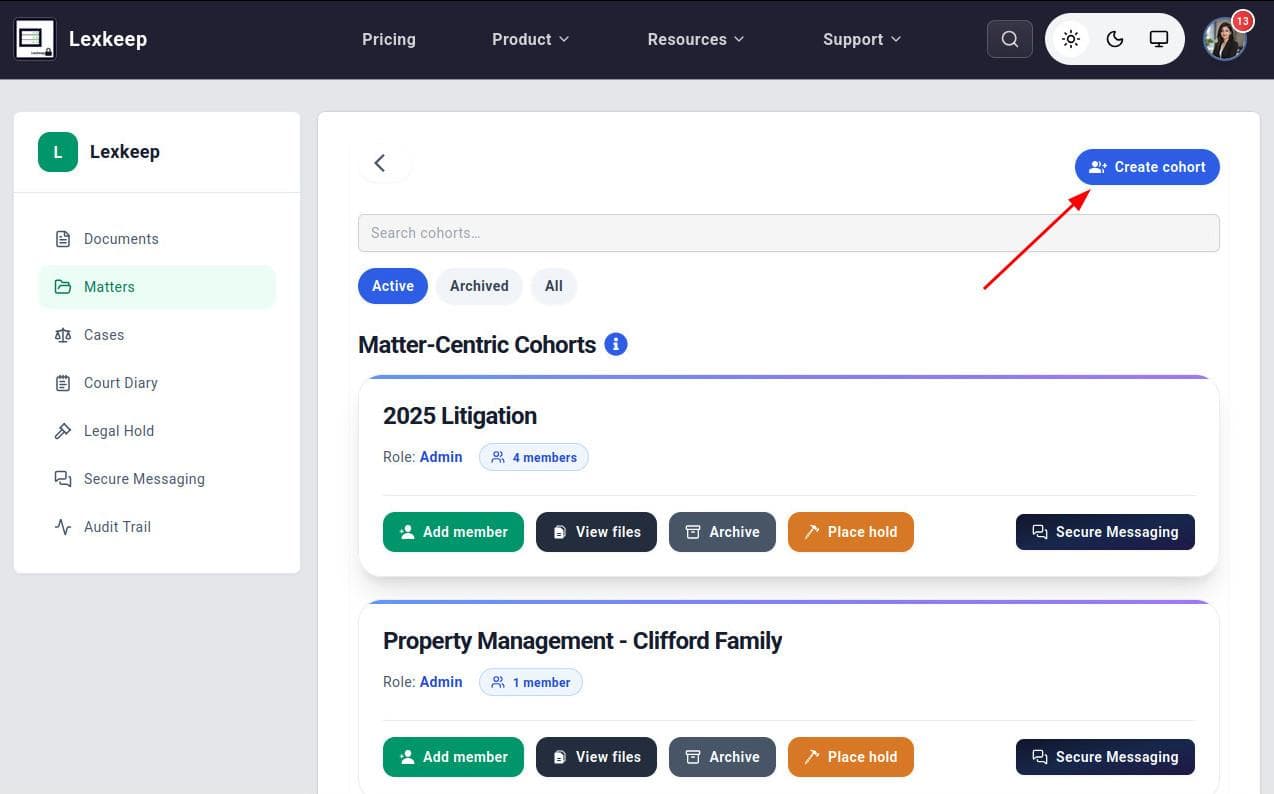
- In the left sidebar of the Documents page, select Matters.
- Select Create Cohort in the upper-right corner of the page.
- In the Create a New Cohort form, enter the required details:
- Cohort Name: Enter a clear name for the matter, client, project, or shared work area. Cohort names must be between 3 and 50 characters.
- Cohort Information: Optionally add a short description to explain the cohort’s purpose. This can help members understand what records belong there.
- Select Create Cohort.
Lexkeep creates the cohort and makes it available for document management and collaboration.
After creating a cohort
Once the cohort is created, you can begin to:
- Upload files related to the matter or project.
- Keep related records in a single controlled location.
- Invite members to collaborate.
- Grant access to users who only need to view records.
- Manage permissions according to each member’s responsibilities.
- Use secure sharing and document-management workflows for sensitive files.
Before inviting others, consider what level of access each person requires. Give users only the access needed for their role, particularly where the cohort contains confidential, privileged, personal, or commercially sensitive information.
Good practice for cohort names
Use names that are clear but do not unnecessarily expose sensitive information. For example:
Project Atlas – ContractsClient A – Regulatory ReviewInternal Investigation 2026Board Materials – Q3
Avoid vague names such as
New Matter
,
Documents
, or
Important Files
, as these can make records harder to locate and manage over time.