
Secure external share
Published on: (Updated on: )
Use Secure External Share to provide access to a document for a recipient who does not have a Lexkeep account. Lexkeep generates a secure link and a passphrase for the selected file version.
Anyone who has both the link and passphrase can access the shared file. Treat both as confidential and send them separately where possible.
Create a secure external share
- Open the relevant cohort and locate the document you want to share.
- Find the specific file version you want to provide. Confirm that it is the correct and final version before sharing.
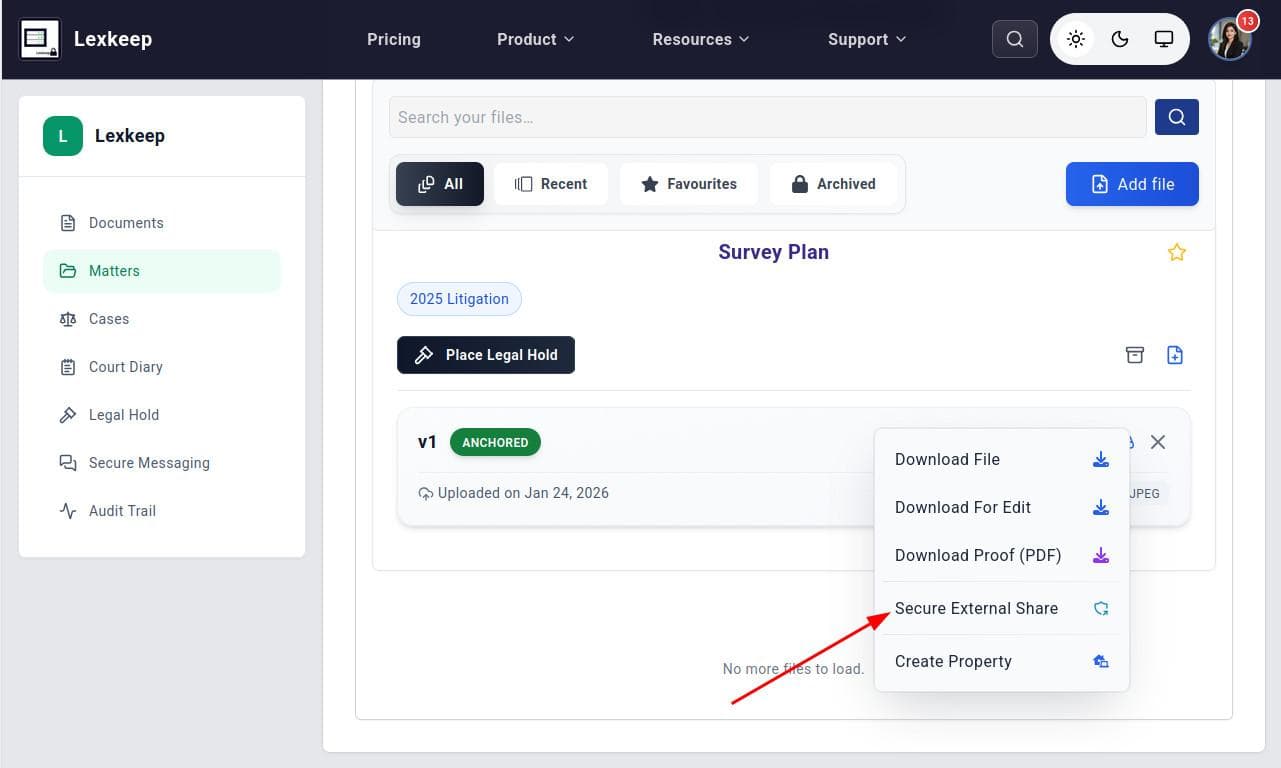
- Open the actions menu for that file version.
- Select Secure External Share.
- In the confirmation window, select Generate secure link.
Lexkeep generates a new secure link and passphrase for the file.
Share the link and passphrase securely
Send the secure link to the external recipient. Provide the passphrase separately, using a different communication channel where appropriate.
For example:
- Send the link by email and the passphrase by phone or secure message.
- Send the link through an approved collaboration channel and provide the passphrase separately.
- Confirm the recipient’s contact details before sending either item.
Do not include the link and passphrase together in an uncontrolled or widely forwarded message.
Important considerations
A secure external share is designed for recipients outside Lexkeep. Before creating one, check that:
- You are sharing the correct file version.
- The recipient is authorized to receive the document.
- The document does not require additional approval before external disclosure.
- You have followed your organization’s confidentiality, privacy, legal-hold, and information-security requirements.
The secure link and passphrase apply to the file version selected when the share was created. If you upload a newer version, create a new secure external share for that version rather than assuming the existing share gives access to it.