
Start a secure team conversation
Published on:
Lexkeep allows cohort members to communicate through a secure team conversation. Each conversation is connected to its cohort, helping keep discussions associated with the relevant matter, project, or work area.
Start or open a team conversation
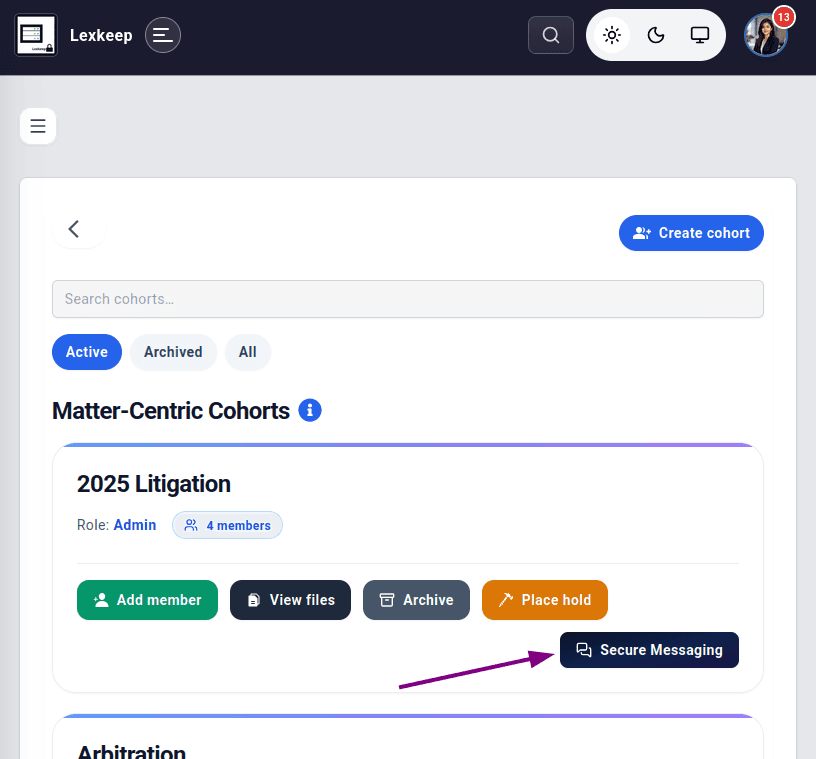
- From the left workspace menu, select Matters.
- Find the relevant cohort card.
- Select Secure Messaging.
- Open the existing conversation or start a new conversation, where available.
- Send your message.
Matter-centred communication
Secure team conversations are linked to the cohort in which they are created. This helps keep team discussions in the same context as the members and files associated with the relevant matter.
For example, you can use separate cohorts for separate matters, projects, or teams, with each cohort maintaining its own conversation space.
Adding members
When a person joins a cohort, they can participate in the cohort’s secure team conversation from that point onwards. They do not have access to messages sent before they joined the cohort.
If a new member needs earlier context, provide an appropriate summary or share the relevant approved material through the cohort.
Good practice
- Select the correct cohort before sending a message.
- Use separate cohorts where matters or access requirements differ.
- Review cohort membership regularly.
- Add and remove members as responsibilities change.
- Keep sensitive matter discussions within the relevant cohort conversation.