
Create a matter with role-based access control for document and records management
Published on: (Updated on: )
A matter is a controlled space for organizing documents around a client, case, project, team, or shared purpose. It gives authorized members a central place to store files, collaborate on records, and manage access to sensitive information.
Create a separate matter when you need to keep documents and participants distinct from other work. For example, you may create a matter for an internal investigation, transaction, litigation, regulatory response, client engagement, or governance project.
Before you begin
You must be signed in to Lexkeep and have permission to create matters.
When naming a matter, use a clear and recognizable name. This makes it easier for members to identify the correct matter and reduces the risk of uploading documents to the wrong location.
Create a matter
- Open the user menu in the upper-right corner of Lexkeep.
- Select Documents.
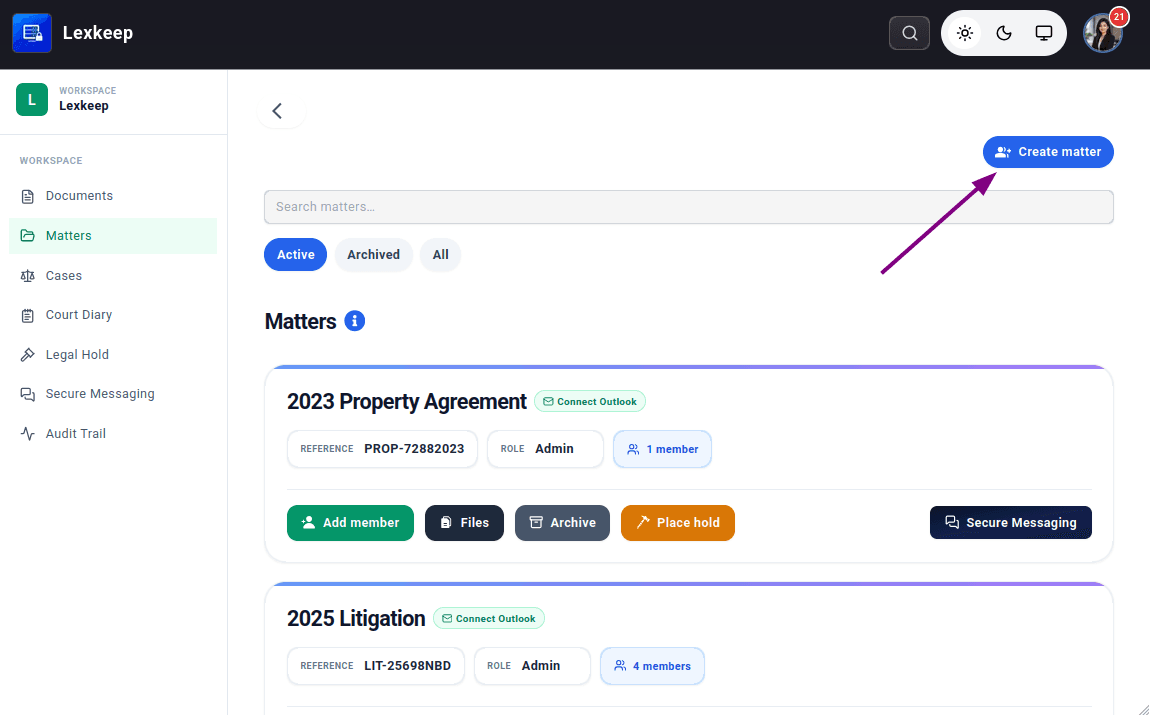
- In the left sidebar of the Documents page, select Matters.
- Select Create Matter in the upper-right corner of the page.
In the Create a New Matter form, enter the required details:
Matter Name: Enter a clear name for the matter, client, project, or shared work area. Matter names must be between 3 and 50 characters.
Matter Information: Optionally add a short description explaining the matter’s purpose. This can help members understand what records belong there.
- Select Create Matter.
Lexkeep creates the matter and makes it available for document management and collaboration.
After creating a matter
Once the matter is created, you can:
- Upload files related to the matter or project.
- Keep related records in a single controlled location.
- Invite members to collaborate.
- Grant access to users who only need to view records.
- Manage permissions according to each member’s responsibilities.
- Use secure sharing and document-management workflows for sensitive files.
Before inviting others, consider what level of access each person requires. Give users only the access needed for their role, particularly where the matter contains confidential, privileged, personal, or commercially sensitive information.
Good practices for matter names
Use names that are clear but do not unnecessarily expose sensitive information. For example:
- Project Atlas – Contracts
- Client A – Regulatory Review
- Internal Investigation 2026
- Board Materials – Q3
Avoid vague names such as New Matter, Documents, or Important Files, as these can make records harder to locate and manage over time.