
Add members to a matter
Published on: (Updated on: )
Add members to a matter when they need access to documents and activity relating to a specific matter, case, project, client, or team. Matter membership helps keep matter-related records in a controlled location while allowing authorized users to collaborate.
To add someone, the person must already have a Lexkeep account. They join the matter after accepting your invitation.
Before you begin
Make sure that:
- A matter exists for the relevant work area.
- You have permission to add members to that matter.
- The person you want to invite already has a Lexkeep account.
- You know the email address associated with their Lexkeep account.
Only add users who need access to the matter. Before inviting a member, consider the sensitivity of the documents and records it contains.
Add a member to a matter
- Open the user menu in the upper-right corner of Lexkeep.
- Select Documents.
- On the Documents page, select Matters from the left sidebar.
- Find the matter to which you want to grant access.
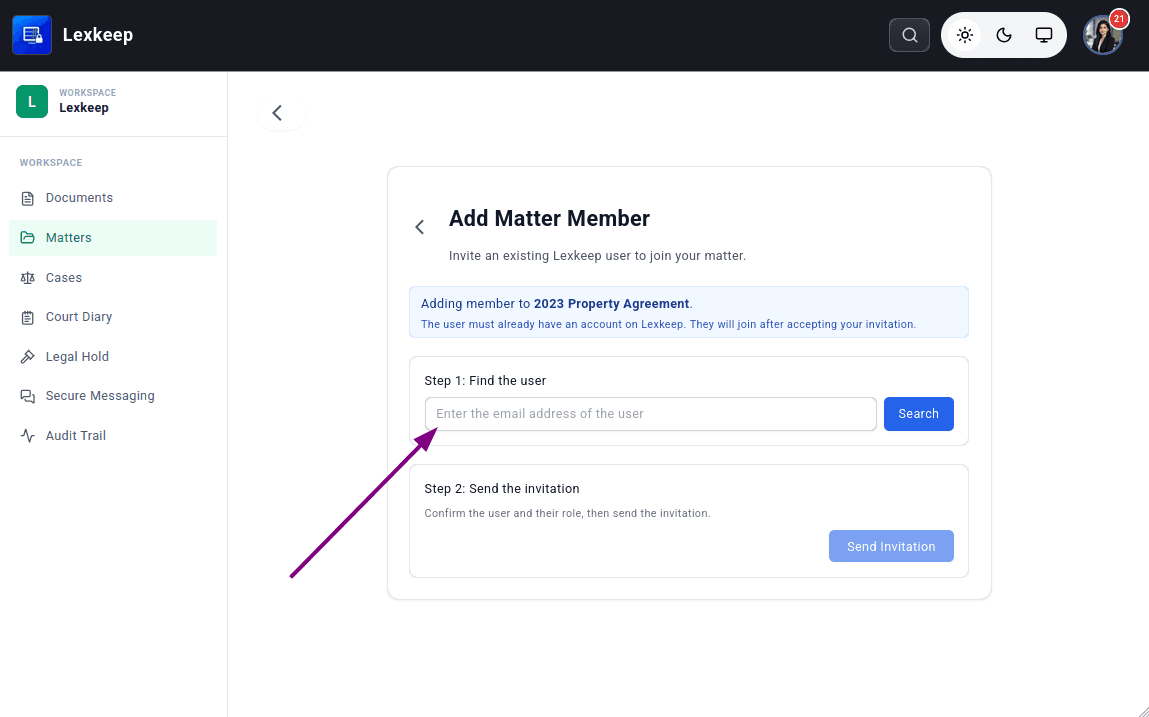
- On the matter card, select Add Member.
- In Step 1: Find the user, enter the email address of the existing Lexkeep user.
- Select Search.
- Review the search result and confirm that you have selected the correct person.
- If prompted, choose the appropriate role or access level for the member (see User roles and permissions).
- In Step 2: Send the invitation, select Send Invitation.
The invited user receives an invitation to join the matter. They become a member after accepting it.
After sending an invitation
Until the invitation is accepted, the user may not be able to access the matter or its documents. If access is urgent, confirm that you entered the correct email address and ask the recipient to check for the invitation.
Once the user accepts, their access is determined by the role assigned during the invitation process. Review matter membership regularly, particularly when a matter closes, a user changes roles, or access is no longer required.
Good practices
Use the principle of least privilege: grant only the access needed for the member’s responsibilities. This is particularly important for matters containing confidential, privileged, personal, evidential, or commercially sensitive records.
Before adding an external adviser, client, expert, or other third party, confirm that matter access is appropriate for the documents they will be able to view.