
Share a confidential file securely with counsel or a client
Published on:
Lexkeep allows you to share confidential files with authorized counsel, clients, and other matter participants through secure matter messaging. Files shared in a secure matter conversation are protected with end-to-end encryption.
Use this feature when the file is relevant to an existing matter and the intended recipient is authorized to access it.
Before you begin
Make sure that:
- You are signed in to Lexkeep.
- The relevant matter exists.
- The intended recipient is an authorized member of the matter or is otherwise eligible to participate in the conversation.
- You have permission to share the file.
- You have confirmed that the file is appropriate to share with the selected recipients.
Before sharing, check the file for information that is unrelated to the matter or intended recipients.
Share a file in a secure matter conversation
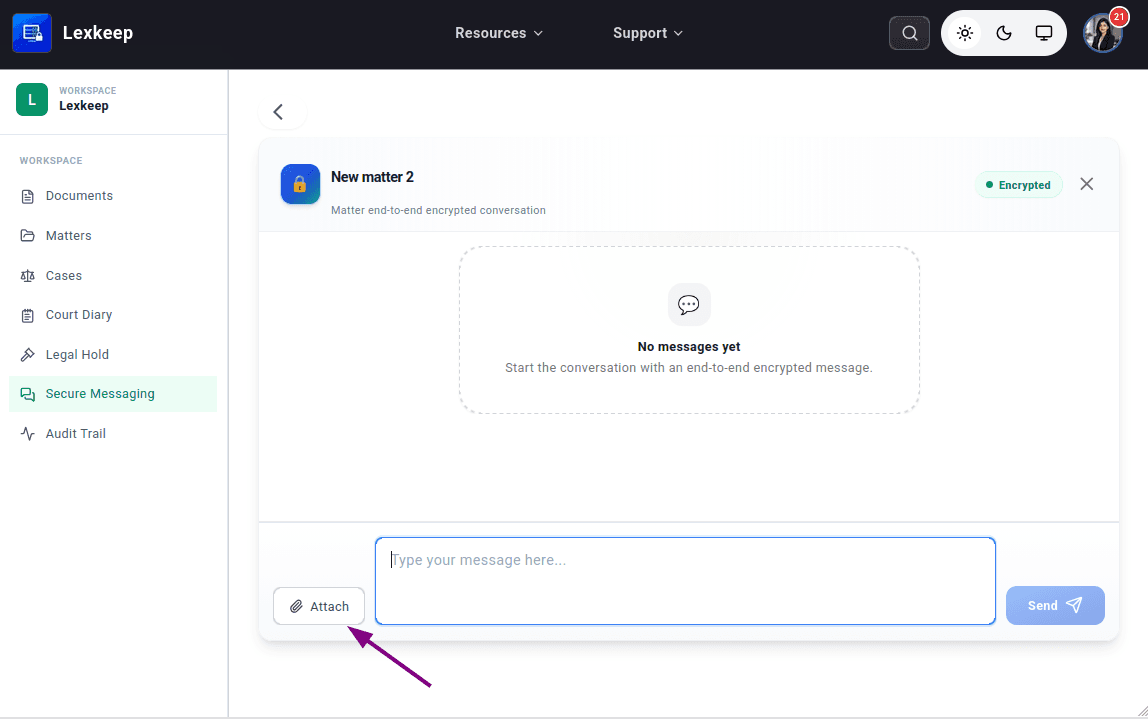
- Open Secure Messaging.
- Open the secure conversation for the relevant matter.
- Review the conversation and confirm that it is the correct matter.
- Select Attach.
- Choose the file you want to share.
- Review the selected file and recipients.
- Add a message explaining the purpose of the file, if needed.
- Select Send.
The file is shared in the matter’s secure conversation.
Review the file before sending
Before selecting Send, confirm that:
- You selected the correct matter.
- The file is the intended version.
- The file name does not unnecessarily reveal confidential information.
- The file does not contain unrelated personal, privileged, or commercially sensitive information.
- The recipients are authorized to receive it.
- Any accompanying message is addressed to the intended audience.
If the file contains information for only one recipient, consider using a direct secure conversation instead of a matter conversation with multiple participants.
Sharing with counsel or a client
When sharing with external counsel or a client:
- Confirm their identity before sending the file.
- Check that they are participating in the correct matter.
- Share only the information needed for the matter.
- Use a clear message to identify the file and its purpose.
- Avoid including confidential information in the message unless the recipient needs it.
- Confirm that the recipient can access the file after sending it.
Do not use ordinary email or an unapproved file-sharing service to send the file if the matter requires secure sharing.
After sending
The file and accompanying message become part of the secure matter conversation. Matter access is governed by the recipient’s permissions and membership.
Review the conversation to confirm that the file was sent successfully. If you sent the file to the wrong matter or recipient, notify the appropriate matter administrator promptly and follow your organization’s incident or records-management process.
Good practices
- Share files only through the correct matter conversation.
- Confirm recipients before every send.
- Use descriptive but privacy-conscious file names.
- Avoid sending unnecessary copies of the same file.
- Keep confidential discussions and documents within the relevant matter.
- Review matter membership regularly.
- Remove or restrict access when a person no longer needs to participate, in accordance with your organization’s policies.
Next: